Thursday, October 31, 2013

Instantly Get Rs.10 Free Recharge using DuDuBu.com

free 10 rs recharge trickHello Guys. how have you been??
To all my Nepal and Indian viewers -- HAPPY TIHAR and HAPPY DIWALI.

To all US and European viewers -- HAPPY HALOWEEN

Todays post is a short gift from my side :P

Today I have another inaugural offer from DuDuBu.com as it's a new website and to create a nice customer base its provide free Rs.10 recharge right from their website after doing a free signup. So obviously there is not survey or anything you need to do in order to get this offer but just a simple signup on their website will get you this working recharge.
Now the best part is you can use a different email ID to create a new account in order to get other numbers recharged, but remember you are only allowed to use one mobile number at a time and only one time this recharge will be provided, so you cannot sign up and again and again for getting one number recharged as this website will not allow you to do that. So now lets get started.
  1. free-mobile-rechargeVisit DuDuBu.com
  2. Now just press Sign-Up button and then create a free account.
  3. So you need to verify your email by entering the code you got in your mail.
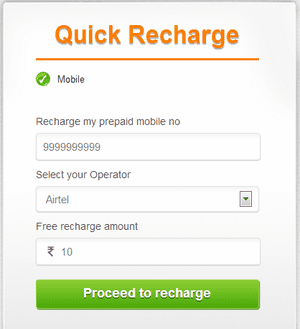
  4. Now you will see something like in the image on the right.
  5. Just enter your Mobile and choose your operator.
  6. Now just press Proceed to Recharge and you will be taken to the Payment Page where you will automatically see 10 rupees got less.
  7. So just press Proceed to recharge, now just wait till your recharge get done successfully.

Friday, August 2, 2013

How to Boost Your Wi-Fi Signal Using a Beer Can -DISCOVERY

Well peeps.. heres what I got yesterday while surfing net in my pastime.

In today's informative world internet is used by everyone and if you are at home you will always want that your whole house is covered by Wi-Fi so that anytime, anywhere you can access it. Moreover internet speed is must at long distance. Well, now you can get some nice Wi-Fi Boosting using a simple and efficient Beer Can!!

Yes and it works 100%.

I grabbed this amazing trick from Discovery Channel’s Website. Hope you like it and do leave comments.

  1. boost-wifi-beer-canEmpty a Beer can obliviously after drinking that and than you have to make sure that its washed thoroughly so that there is no smell or anything left by that liquid Beer, because if anything's is left than it will be a problem and smell will be there in your whole room.
  2. Now after washing that Beer Can thoroughly you have to remove that small can opening piece you can see that in the image on the right hand side.
  3. Now after you have removed the small can opening piece you can to cut the can in the round diameter like in the image on the right hand side, we are doing this because we have to open that can and make a shape like small antenna.
  4. So now you have to repeat the same step on the other corner but this time you have to leave small space between the cuts so that the can remains attached to the bottom and we will have a look of antenna for our modem - router for boosting purpose. So remember this step is really important to follow else your antenna will not look like how it should be.
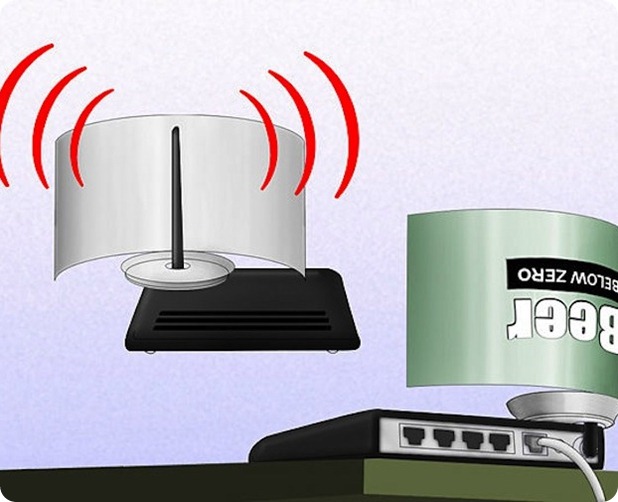
  5. So now the main steps are completed, now you have to cut the can vertically from between like in the image on the right hand side. and your antenna will take looks like how it should be and now you only have to attach this antenna to your modem so that we can se its effect.
  6. Now last step is too attach this antenna to your modem - router, you can use any adhesive or M-Seal which has really a good hold, so in this step you can change directions of your antenna suiting your will, like in which direction you want it too boost the signal.
  7. Now your antenna is ready for boosting purpose and it will look something like below you can check the image below.
beer-can-wifi-boost

Sunday, July 14, 2013

TOP 10 YOUTUBE VIDEOS THAT CREEPS YOU OUT


<Please note that the below posts may be offensive
with regard to some country policies.
The post may also contain some action of violence or nudity. Viewers Discretion is Advised>


Genocide School by Jared Lee Loughner


 This video was uploaded to YouTube by the Arizona shooting suspect Jared Lee Loughner. It has since been taken down from its original YouTube location, but news organizations as reputable as the Wall Street Journal have confirmed its legitimacy as the video that resulted in Loughner being expelled from Pima Community College. The madman later went on to shoot 20 people, injuring a U.S. senator and killing six of the victims, including a district court judge. These ramblings show just how disturbed the young shooter was before his arrest, and listening to his rantings are chilling to say the least.

Here's the link to view the video: VIDEO LINK


  Edarem


Sure, the old man in this video with his bad sweater, terrible teeth and frazzled hair, is a little creepy, but is he someone's grandpa playing on YouTube really bad enough to get on the list of the most creepy YouTube videos ever? Yes, when that “grandpa” is actually a sex offender who was eventually sent back to prison for violating his parole because of said videos.

Here's the link to view the video: VIDEO LINK


Crooked Rot

I've left out creepy music videos and other clips that weren't created specifically for YouTube, which is why it's so nice to be able to include a video of such caliber that was actually intended for web distribution. This video by David Firth was an experiment in stop motion photography and the result is a spine-tingling mess of mannequins, pig heads, scratchy footage and rubber hands.


Here's the link to view the video: VIDEO LINK

The Biggest Pimple In The World


While this might not officially be the biggest pimple in the world, it's most certainly a creepy sight to watch it get popped. In fact, it is so nasty that the video was flagged as 18 and up by the YouTube community despite the fact that there is nothing violent or sexual about the actual footage


Here's the link to view the video: VIDEO LINK


KerryJTV


If you haven't heard of masking, then I'm sorry to introduce you to the disturbing world where men wear expressionless women's masks and dance around trying to look sexy. Of all of the maskers, the most famous star is Kerry, who not only has her own website, but her own YouTube channel as well. Here's a taste of the fun.

Here's the link to view the video: VIDEO LINK


Well that's our TOP 5 for todays countdown.. Tomorrow, we will be posting our next hot top-5 CREEPY videos. Hope you really enjoy..argh!!! I mean creep out. ;) 

Till then KEEP SHARING!

FREE RECHARGE AGAIN! (ONLY FOR INDIA)

After a long gap and research,
Again We are back to some actions. My humble apologies to all my viewers that we went offline without pre-notice.

Good part-- We are back again. So this time, I have come up with really new exciting ideas, hacks, tricks and some really (and yeah I mean every word of it) really cool stuffs.

Well to start with today's post, I think something easy but definitely cool will work.

So, Who wants a free recharge. Raise ur hands. (I can see everyone raising their hands.)  Ah! Thats what I want..active participation. Well so recently after ULTOO (its a good site too),  LAAPTU.COM has come up with real new ideas.

Check it out. The registration procedure is rather simple and easy.

Thursday, August 9, 2012

Instagram - Your Photo Download Solution

Instagram is a free photo-sharing program and social network that was launched in October 2010. The service allows users to take a photo, apply a digital filter to it, and then share it with other Instagram users they are connected to on the social network as well as on a variety of social networking services.Instagram currently has 80 million registered users. A distinctive feature is that it confines photos to a square shape, similar to Kodak Instamatic and Polaroid images, in contrast to the 4:3 aspect ratio typically used by mobile device cameras.
Instagram was initially supported on iPhone, iPad, and iPod Touch; in April 2012, the company added support for Android camera phones running 2.2 (Froyo) or higher. It is distributed via the iTunes App Store and Google Play.
In its largest acquisition deal to date, Facebook made an offer to purchase Instagram (with its 13 employees) for approximately $1 billion in cash and stock in April 2012, with plans to keep it independently managed. However, the closing on the purchase has been delayed indefinitely pending Federal Trade Commission review.
 --  Those were some random facts from wikipedia---

Instagram has evolved as a fun and easy way to snap, share and edit photos among friends. After facebook has acquired Instagram it has been able to recognize itself as one of the most used app. Well apart from many people are using this app for sharing purpose, Instagram has not provided any official way to download all the image in bulk for any user.

But wait, I have found the solution to this. Here's what you need to do and the problem is solved!!
instagram downloader tool
Download Images with this tiny tool is really really easy  (you need to trust me sometimes :P )...what you  just need to do is print in the username of the user you want to download images from, and than just click on the download button and your images will start downloading.

This tool is available for free and can downloaded from Instagram Downloader Website.

So simply enjoy this tool and do share this post with all your friends.

IMPORTANT NOTICE :: We thought of tracking our users share/likes in facebook, twitter or g+. The survey results will yet take some time. If we succeed, we thought of awarding people with the most shares. So please help us complete the survey with positive feedback . So hit the share button. :)

Thursday, July 26, 2012

6 Ways to Watch London Olympics 2012 Live Online

watch-olympics-2012-online
I guess most of the sports enthusiastic people most awaited scenario has begun!! Oh yea, I am talking about LONDON OLYMPICS 2012.

The 2012 Summer Olympics, aka London Olympics 2012 is scheduled to take place from 27 July to 12 August 2012. The 2012 Olympics is by far the most popular, most spectacular & most awaited sporting event of the year.
But in case you are traveling or just won’t be having access to the television, you can simply catch all the live Olympic action right on your PC, phone or tablet! Isn't that a wonderful idea?? As always, we bring you a complete guide to watch Olympics 2012 online for free!!

1. Watch Olympics 2012 Live on YouTube
Early last month, the IOC announced that it will provide live coverage of the London Olympic Games to 64 countries on its YouTube channel free-of-charge.. In case you prefer to watch the highlights of Olympics 2012, do check their YouTube channel. If you are in a country other than those listed above, read further.
watch-olympics-on-youtube

2. Watch London Olympics Live on NBC

As before, NBC will offer live streaming of London Olympics 2012 on the web including smartphones & tablets. NBC promises to live stream all the 302 events in addition to highlights & video clips. But the issue is, NBC’s live streaming of Olympics 2012 is restricted to the US. So, if you are in the US, rejoice. You now know how to watch London Olympics live online. 
nbc-olympics

3. London Olympics 2012 Live Streaming on BBC & Facebook

BBC, the host broadcaster of London Olympics 2012, will run 24 simultaneous streams in addition to the main BBC channels and has partnered with Facebook to broadcast live events. Users are able to share information about what they are viewing with their friends, as well as discuss the action with other fans via a live-chat feature. They have an iOS app & an android app as well. As you’d expect, the app is geo-restricted to the visitors from UK. Others have to use free UK VPN like Expat Shield or paid services like boxpn, or else read further.
olympics-live-stream
Note: Alternatively, people in UK can check out TVCatchup.com which lets you watch free-to-air UK channels including the BBC.

4. Watch Olympics 2012 Live on YouTube with CTVOlympics

CTV, the official broadcaster for Olympics 2012 in Canada will be live streaming the sporting events at London Olympics right on YouTube. If you are in Canada, this is a great way to watch Olympics on the go. Yet again, this is geo-restricted to Canada. Others can read on for more options.

5. Watch Olympics 2012 Live on Doordarshan

Doordarshan is national broadcaster of India and will be telecasting the London Olympics 2012 for free across India. But even those outside India will be able to catch the Olympics 2012 live stream via DD Sportsand DD National. Unofficial but effective.

6. Follow Olympics 2012 on Olympic.Org

That’s right. You can follow the Olympics 2012 on the official website of IOC. Though you can’t expect the live streams of sporting actions, be sure to get the latest and most extensive coverage of each of the sporting event at London Olympics 2012, including live results, medal ceremonies, event schedules, athlete bios, team stats, news, photos and videos.
Be sure to bookmark this article and check back in coming days. We will include more ways to watch Olympics 2012 online as and when they become available.

Tweet--LIke---G+ to encourage us ! Happy watching!

Google's New handwriting Search Feature

Who perhaps may not google. It is one of the best search engine that has been able to give services to many people in various field of interest or professional areas. 


Well many of viewers report that they have problems with the small keypad in smartphones, ipads etc and to make searches quick and easy... always a BIG problem. Not to worry. GOOGLE has brought you an easy way to deal with such daily humdrum!!

Google has always been so much innovative in providing people with variety of options they can choose to search from, they initially started with the text than arrived the image, than started the voice options and now you have the ability to write down your queries on Google's homepage and than will be converted into text for you to search easily. Isn't that so much easy and fun ?? 


google handwrite feature
Well obviously every time its not convenient for you to enter your queries on your smartphone using than small keyboard, so now the whole Google's homepage is your canvas for writing down your queries and searching them easily on your smartphone or iPad.

How to Enable Google Search Handwriting Feature :

google handwrite feature
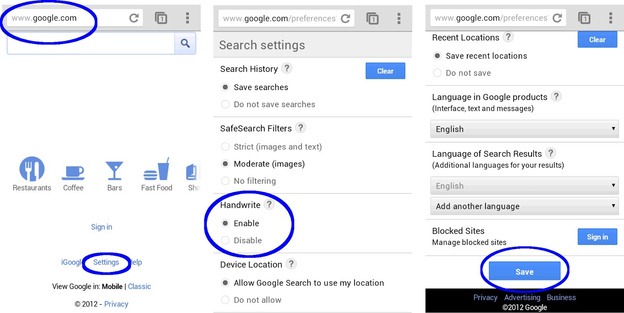
Well if you wanna start exploring this new feature you can simply turn it on by going to Settings > Handwrite > Enable

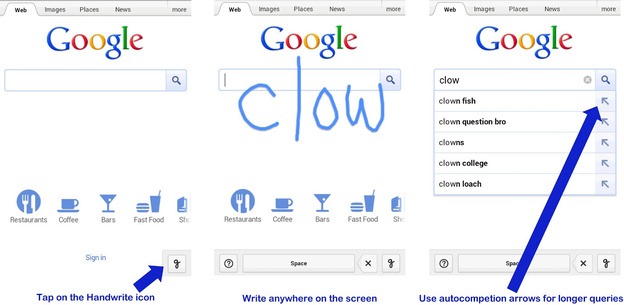
Once the feature is enabled, tap the Handwrite icon on the bottom right corner of your screen to activate the writing surface. Write a few letters and you’ll see autocomplete options appear below the search box. If one of the options is what you’re looking for, just tap it to search. For longer queries, you can continue writing and use the arrows next to the autocompletions to move the right one into the search box. Since you can write anywhere, you don’t have to look back and forth repeatedly from the keyboard to the search box.  

Please do leave comments below or like , g+, tweet to encourage us to post innovative ideas ! Your votes count a lot! :) Have a good day.