Well since my last blog, much of things have changed. World Cup Football has ended. And yesterday, World Chess Championship was titled to our favorite Magnus Carlsen.
Anyway, Thanks for the incredible support you guys have given to my blog. Your love has always kept me motivated. I have also posted a thank you note to my viewers in my facebook page and twitter page http://www.twitter.com/sushil_NASA (do follow me there too for the blog updates)
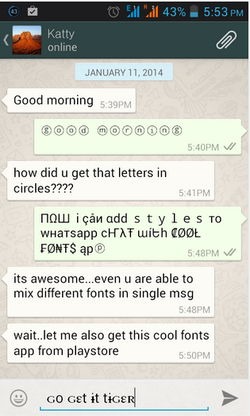
So lets get started. Recently I have been searching quite a lot on whatsapp font, as we know. we all use it along with viber (in my next blog - do mail me if you guys can contribute, reach me @ sweet.nasa1@gmail.com)
To all newbies out there, whatsapp is a social android app that helps you stay connected with your family members, friends and foes :P
Now, what I am posting here seems to work in some sms services too (manufacture dependednt).
Anyway, Thanks for the incredible support you guys have given to my blog. Your love has always kept me motivated. I have also posted a thank you note to my viewers in my facebook page and twitter page http://www.twitter.com/sushil_NASA (do follow me there too for the blog updates)
So lets get started. Recently I have been searching quite a lot on whatsapp font, as we know. we all use it along with viber (in my next blog - do mail me if you guys can contribute, reach me @ sweet.nasa1@gmail.com)
To all newbies out there, whatsapp is a social android app that helps you stay connected with your family members, friends and foes :P
Now, what I am posting here seems to work in some sms services too (manufacture dependednt).
How to get this Cool Fonts for Whatsapp & SMS ? - 5 easy steps
- Install the Cool Fonts Application on your android device.
- Now after installing it you can open the app and you will see the font selecting option.
- Choose the font you like and then simply write your message.
- Now you will see icons below the message field that allows you to export your message directly to your WhatsApp or Facebook.
- So click those and you can share your message easily, well the other way is to copy the whole text and then share it on your own, where ever you would like to share it.
Ha, thats pretty easy!! Wasn't it.
If you guys still did not figure it out or having problem with installation, please let me know in comment box below. Our moderators shall be reviewing them and replying to you as soon as possible. Till then enjoy and let me know what would you like to learn more about.
Enjoy Christmas. :) Merry Christmas friends.
If you guys still did not figure it out or having problem with installation, please let me know in comment box below. Our moderators shall be reviewing them and replying to you as soon as possible. Till then enjoy and let me know what would you like to learn more about.
Enjoy Christmas. :) Merry Christmas friends.