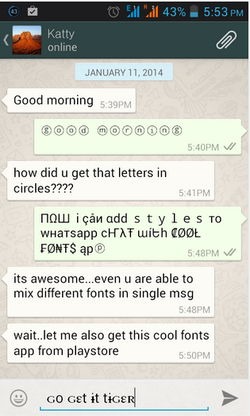
Hey guys, Sorry for the late post. The post has been delayed as I was involved in real research this time to amaze my viewers with something they always wish they could do.
Many of my viewers were asking me to post hacks regarding apps that they use in daily life. BANG ON!!! Here it is, special edition to them.
This time I am up with something totally crazy which will drive your friends nuts. What more?? If you can do the tricks in your whats app. Lovely, Isn't it? :P :P I know.. I know I am gr8 :P :P
Well, so, without wasting our precious time, lets get switched on quickly to tricks that you can perform in your whats app.
Whatsapp is considered as the most preferable chatting client for
iPhone and Android devices as its pretty user friendly interface and
provides all the basic needs a chatting client requires, you can easily
share images, audio notes, live recordings, share your current location
and even upload small videos. Well earlier we have posted on how you can
easily install whatsapp messenger on your windows pc in case you wanna
use it right away from your computer you can do that too.
#1. Prank your Friends by Changing their Profile Picture
Well
just found this awesome trick, if you want to prank your friends by
displaying then how they actually appear in your profile, then we have
any trick for that. Actually by doing some files replacement you can
change the actual profile pic of you friend pretty easily to any image.
- Well
just search for some nice scary or funny image that you think could
easily paralyze your friends on how they actually look. (just search
these images on Google Image search).
- Now after you have found a nice image just make sure to resize the image to 561 X 561 Pixel dimension as its must. (you can use RIOT image resizing feature for this).
- Now you need to navigate to the following path SD Card > Whatsapp > Profile Pictures.
- Now you will see your friends profile pictures with name's similar to their phone numbers with prefix attached to it.
- Now just rename your new image to that same file name and then replace the old image with the one.
- Well for iOS device use iFunBox to do this same trick and on android you can use a nice file manager to achieve this effect.
Now
simply restart your device and your new profile pic will be rocking,
now simply show and ask your friend what kind of profile picture they
have uploaded it looks ugly, they will be amazed :p
#2. Getting back Deleted Messages on Whatsapp !
Deleted
few conversations mistakenly, wanted to get all those conversation back
as it means you a lot, well you might not be aware about the automated
Whatsapp backup that it creates everyday @ 4PM which is actually store
in the SD Card of your Android Device, well we are going to see how you
can easily restore that database.
- Navigate to the Whatsapp Database folder, SD Card > Whatsapp > Databases.
- In the database folder you will see some files something like msgstore-2014-01-04.1.db.crypt. So as you can see these files even contain the date on which its created + you will also see a file msgstore.db.crypt, well this is the main file.
- So now just rename this file msgstore.db.crypt to something like backup-msgstore.db.crypt.
- Now
after you have successfully renamed your file, just change the another
file that contains the appropriate date like choose the one that's
latest or the one you think that might contain your chat conversation.
 So now rename that file to msgstore.db.crypt
and then the last step is to navigate to Setting > Applications >
manage applications > Whatsapp, and click on Clear Data option to
remove all the data.
So now rename that file to msgstore.db.crypt
and then the last step is to navigate to Setting > Applications >
manage applications > Whatsapp, and click on Clear Data option to
remove all the data. - That's it now your msgstore.db.crypt will be restored and obviously that the file that contains your chat conversation.
- So now as soon as you open your WhatsApp again it will ask you to restore from the Backup.
- Just press Restore option and everything will be restores pretty easily.
So
guys this was the easiest but little but lengthy way to restore your
deleted conversation on WhatsApp. So now do no worry in case you have to
delete those conversation you know where and how to restore then later
:)
How to View WhatsApp Messages Backup File Online !
Well
thinking if there is any easy way by not restoring your file onto the
whatsapp messenger but still wanna have a look on what conversation you
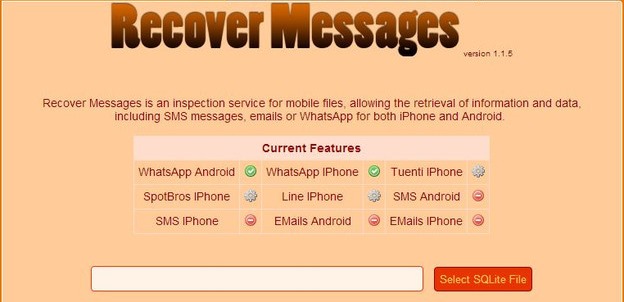
had, well there is awesome online service called "
RecoverMesages.com"
that allows you to upload your .crypt file that you got from your SD
Card online and view your messages easily, well just visit the above
mentioned website , upload your date and hit SCAN.
#3. Hide Last Seen Time from your WhatsApp Profile
Don't
like to display that last seen time to the another person, just want to
stay hidden, well earlier it was not possible and we use to use some
3rd party apps, well now it can done officially.
- Open WhatsApp application on your device.
- Navigate to Settings > Chat Settings > Advanced > Last Seen Timestamp.
- It will be one just disable it and that's it now no one can see your last seen timestamp. So its officially disabled.
#4. Hide One Image into Another for Nice Prank :p

Well
you might have faced this thing but you might ignored as you thought it
could not be possible, but yes you can easily fake any image by just
simply using original image as your masked image and using another image
as your fake image.
Well we will be using the Magiapp for
Android that will allow you to hold two images one your True Image and
the other one will be your Fake image that will shown when someone
clicks on your original image.
- Download & Install Magiapp for android.
- Now
after installing this wonderful app just fire it up and then you will
see interface something lie in the image on the right.
- Now
just click on the True Image option and choose your original image and
then click on the Fake Image option and choose your pranky image.
- Now after selecting your images just press Do Magic ! option and voila! its done now just share your image with everyone.
#5. Hacking your Friends WhatsApp Conversation (My personal best)
Well
now the same trick mentioned in the first step can be used in order to
hack your friends WhatsApp conversation. You can easily snatch the
.crypt files from your friends SD Card and then view them online using
the RecoverMessages website.
- Just try to explore the friends SD Card and navigate to SD Card > Whatsapp > Database folder.
- Here you will two files -msgstore-yyyy..dd..db.crypt which will exactly contain date and year when the backup was created.
- Simply copy this files to your computer and then upload this file to "RecoverMesages.com" to view them online.
That's
it now you have easily hacked your friends Whatsapp Database, now you
can view all the conversation and even ask him about his or her crush
;p, so guys this how hacking Whatsapp conversation works, so enjoy.
#6. Password Lock your WhatsApp Application
Are
you really serious about the security and privacy for your Whatsapp
conversation, well now just add a nice password on your Whatsapp
application, so that no one else except you can open your Whatsapp
account.
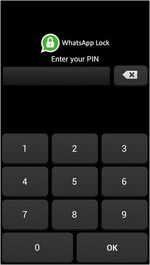
- Download & Install WhatsApp Lock for Android.
- It's a simple application that allows you to add a four digit lock passcode to your Whatsapp application.
- Now after installing the application it will ask you to store a four digit passcode, just do that.
- It even contains an Auto Locking feature that will lock your Whatsapp automatically after sometime.
The
best thing about this application is that if someone enters wrong
passcode few times then if your phone contains the front camera then it
will capture the image of the intruder and store it safely.
SPREAD AMONG YOUR FRIENDS. HOPE YOU ENJOY.
Any queries, just type in the comment box below
OR
You can also personally reach me in facebook.