Showing posts with label windows. Show all posts

Saturday, August 20, 2011

Get Genuine 1 Year Windows 7 Trial Pack


TO USE TRIAL SOFTWARES WITH LIFETIME VALIDITY SCROLL BELOW


 Get Genuine 1 Year Windows 7 Trial Pack
Hey Wazz Up Everyone I am back with another amazing trick which will obviously grab all the beginners Geek attention, because it is really an amazing trick as we are going to get 1 Year Genuine Trial Pack for any Windows 7 version.
Now the first thing its not like that you install the windows and you get 1 Year free license @ every 29th day of the month you have to Run a command to make it 1 extend 1 month genuine trial pack.
So now if you are really interested in the trick just follow the below steps to get into it.

Steps to Get Genuine 1 Year Windows 7 Trial Pack .:

1. Simply install Genuine Windows 7 without entering any Fake or Pirated Product Keys.
2. Now when Windows is installed and trial is going to be over simply open CMD as an administrator and type the below command exactly into it and click enter.

slmgr -rearm
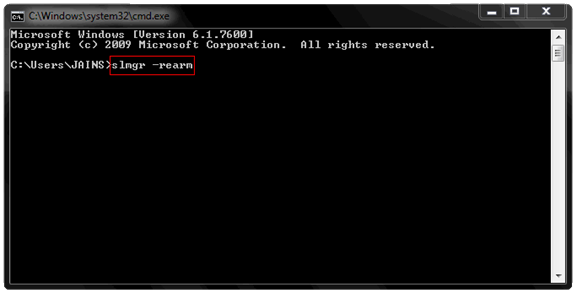
Get Genuine 1 Year Windows 7 Trial Pack
3. Now after doing this something will Pop-up like command completed successfully restart system s restart the system and you will get 30 days back that’s purely genuine.
4. Now This trick is valid only for 4 months means that you can run this command only 4 Times to get 30 days trial back, so we are going to mod this trial times and extend them to 8 times means valid 360 days genuine Windows 7 Trial pack.
5. So now go to RUN and type regedit to open the default Windows Registry Editor. After you have opened it you will see the registry editor having 5 main folder we are going to navigate to the specific folder and we are going to modify a value.Get Genuine 1 Year Windows 7 Trial Pack
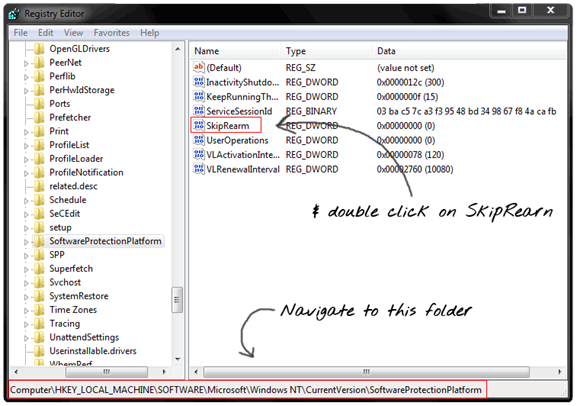
6. So you have to navigate to above folder as mentioned in the image and then double click on SkipRearm.
7. Now you have to change the Value from 0 to 1 to extend the times you can reset the Windows 7 Trial Pack like below image .:
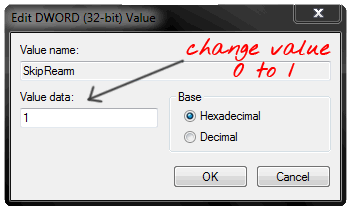
Get Genuine 1 Year Windows 7 Trial Pack
8. That’s it now simply click on OK and you are ready to go reset it as soon as trial is going to be over with slmgr -rearm command make sure you open Command as anadministrator.
Hope you enjoyed this Article and feel free to comment if you face any problems.

Tuesday, August 16, 2011

Bypass Windows Logon to Access any PC!!

Yes, that right we are going to see a very easy method to hack into anyone’s PC without knowing his or her password. The process is really simple we are not going to crack any password but just boot with the Kon-Boot Bootable CD and than Boom it will automatically gain access to the system, as soon as your work is done and you restart the system its again the same password protected.


How to use Kon-Boot Bypasser .:

1. Download KON-BOOT ISO File
2. Now after downloading this above file Burn it to disk or into your USB Drive.
3. Now boot it up and you will see screen like above and than after a restart you will gain access to that PC.
4. After a second restart it will be back to normal so no proof for the hack NJOY this easy Bypasser for Windows Logging Credentials.

Saturday, August 6, 2011

Use mobile camera as PC webcam!!!


Ever felt that your boyfriend/girlfriend is missing you and you have no webcam to make him/her feel special?? Or think it this way.. you are far from your home and want to get connected with home and show some stuffs going on to far home... but alas! you have no webcam...:(( .. Well we have got a solution... Do you have mobile?? Yea, you read it right, A simple mobile with camera in it may do the task.. 

Smartcam is a small utility which can help you in using your mobile camera as a webcam and it is really handy to use so simply downloading it and installing it will help you in using it.

Follow the below steps to see how it works .:

  1. Download the SmartCam Package ( contains windows setup and all the mobile applications install according to your mobile )
  2. After downloading this above package simply extract it and install setup in PC and app according to your mobile phone.
  3. Now you have both the things installed you can use Bluetooth to connect and use mobile camera as a webcam.

So that’s how you can use mobile camera as a webcam, enjoyed this post please +1 and like it above to support us and make us the reputed tech community. Our viewers are our assets :)