Wednesday, April 29, 2015

EARTHQUAKE PREVENTIVE MEASURES - HOW and WHERE?

We all are aware by now that mega-earthquake has hit Nepal and tremors are still felt around the nation. (Nepal Earthquake Log) At this time of crisis, people most often get fear-attack and are unable to act strong.

Since quakes are not predictable, the best approach we can do to deal with such natural catastrophe is to prepare ourselves. Moreover, earthquake may hit any part of world, any time. Hence, it is better to update ourselves with some preventive measures to counter such inevitable disasters.

Here are some of the basic facts you must learn/drill (reminds me of the series The Big Bang Theory -- Share this post if you recall that episode :P )  to prevent ourselves.

>> Please show your support to all the earthquake victims of Nepal by tweeting to @sushil_nasa . If anyone is willing to donate or provide helping hands to overcome this immense crisis may tweet too. Your help counts! <<

Protect yourself
Protect your head with a helmet or cushion, and hide in a safe place, such as under a table. Running outside is potentially dangerous, because roof tiles and glass may fall on you.

Extinguish flames
Major aftershocks can come after the smallest earthquakes. Calmly extinguish any nearby flames.
Caution!!
If you are cooking, oil or boiling water may spill during the quake. Under such circumstances, you should immediately distance yourself from the oil or water and extinguish the flames after the quake stops.

Open your door and secure an escape route
Earthquakes can warp buildings, especially apartment buildings, making it impossible to open doors and escape. Open doors and windows to secure an escape route and prevent yourself from becoming trapped.

Be careful of broken glass
You may injure your feet on broken glass and other objects. Prepare a flashlight and slippers near your bed so you will be able to move safely.

Never return to your house
Once you have evacuated, never return to the house to get money or possessions. You may become trapped under debris or caught in a fire. Try to avoid entering your house until safety is confirmed.

Walk to your refuge area
Many emergency vehicles, such as fire engines and ambulances, will be using roads during disasters. Obstructing emergency vehicles immediately increases the damage caused by a disaster. Never use cars during an earthquake.


Avoid phone calls after a disaster
Phone line usage jumps up during disasters because of people trying to confirm the safety of themselves or others. This can obstruct emergency phone calls, such as 110, 119, and utility information.
Please avoid unnecessary phone calls. When you want to confirm the safety of a person, try to use the NTT Disaster Telephone Message Service (171) or make conversations as short as possible.

Calmly obtain accurate information
False rumors and information can spread during disasters, leading to further confusion. Obtain accurate information from the TV or radio and don’t get tricked by misinformation.

What should I do when...?
When walking outside
Take caution against falling objects, such as signs and broken windows. Tools and construction materials can fall down at a construction site. Protect your head with your bag or coat and keep at a distance from tall buildings.
Stone walls and pillars can also fall down and are potentially dangerous.

When driving a car
Firmly hold the steering wheel, gradually reduce speed, park your car on the left side of the road, and stop the engine. Listen to information on the radio and find out what is happening. If you need to evacuate, leave your keys, keep the doors unlocked, and walk away with your car documents and valuables.

When underground or in a subway
The shaking you feel when you are underground is about half of what you would experience over ground. Additionally, underground areas have strong structures and are safer than high-rise buildings. Calmly evacuate, following instructions from shop clerks and subway staff.

When in high-rise buildings
Elevators with earthquake sensors will stop at the nearest floor. Immediately leave the elevator. If you get stuck in the elevator, use the intercom to contact someone outside and wait for rescue.
When you evacuate from buildings, never use elevators, listen to announcements, and use the stairs to leave the building.

When near the ocean
Head for higher ground and carefully listen to tsunami information. Do not go near the ocean until tsunami warnings have been cleared. Don’t even think about going to watch tsunamis!
 Do share this post among your friends. Share options are below.

Source: http://www.city.sendai.jp/syoubou/bousai-e/05.html

Friday, April 10, 2015

FREE APPLE PAY DECALS

apple pay
Apple Pay is a mobile payment service that lets particular Apple cell phones pay at retail and online checkout. It digitizes and changes the credit or debit magnetic stripe card deal at charge card terminals. Apple Pay will certainly alter how you make purchases with advancement contact-less payment innovation and distinct security functions constructed right into the gadgets you have with you every day. So you can utilize your iPhone, Apple Watch, or iPad to pay in a basic, secure, and personal method.

Pay with Apple iPhone 6

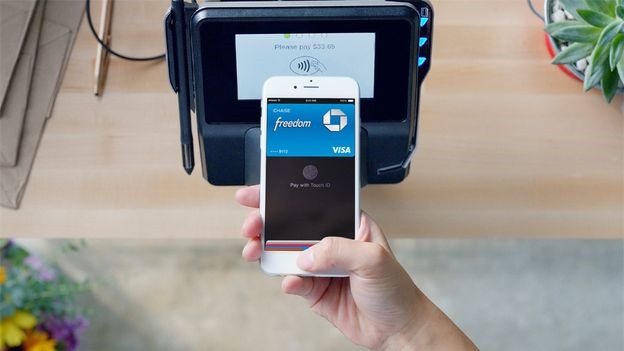
apple pay logoOne touch to pay with Touch ID. Now paying in shops takes place in one natural movement- there's no have to open an app or perhaps wake your screen thanks to the ingenious Near Field Communication antenna in iPhone 6. To pay, simply hold your iPhone near the contact-less reader with your finger on Touch ID. You do not even need to take a look at the screen to understand your payment details was effectively sent out. A subtle vibration and beep let you understand.

Pay with Apple Watch

Double-click to pay and go. To pay with Apple Watch, simply double click the side button and hold the face of your Apple Watch near the contact-less reader. A mild pulse and tone verify that your payment info was sent out.

Quickly Pay within Apps

Hassle-free checkout. On iPhone 6, iPad Air 2, and iPad mini 3, you can likewise utilize Apple Pay to pay with a single touch within apps. Taking a look at is as simple as choosing Apple Pay and positioning your finger on Touch ID.

More Secure Payments

Each time you turn over your credit or debit card to pay, your card number and identity show up. With Apple Pay, instead of utilizing your real credit and debit card numbers when you include your card, a special Device Account Number is appointed, secured, and firmly kept in the Secure Element, a devoted chip in iPhone, iPad, and Apple Watch. These numbers are never ever kept on Apple servers. And when you purchase, the Device Account Number, together with a transaction-specific vibrant security code, is utilized to process your payment. So your real credit or debit card numbers are never ever shared by Apple with merchants or transferred with payment.

Keep your Purchases Private

Apple does not conserve your deal info. With Apple Pay, your payments are personal. Apple Pay does not keep the information of your deals so they cannot be tied back to you. Your latest purchases are kept in Passbook for your benefit, however that's as far as it goes. Keep your cards in your wallet. Given that you do not need to reveal your credit or debit card, you never ever expose your name, card number, or security code to the cashier when you pay in a shop. This added layer of personal privacy assists guarantee that your details remains where it belongs. With you.

How to Grab Free Apple Pay Glass Stickers

Well now if you got full information on what is Apple Pay and how actually it works, you might be implementing it onto your store counters for easier payments. Well it that case you paste some nice Apple Pay decals or stickers onto your counters so that every person coming into your store knows that he can process secure payments.
Well now you can get upto 3 stickers or decals for Apple Pay for free instantly shipped to your home or store. Follow below steps.
  1. Visit https://www.applepaysupplies.com/applepaykit.html
  2. Now choose the quantity you want to get shipped.
  3. Simply enter your address onto the next page and that's it.
  4. Enjoy your decals will be shipped to your for free.

So hope you enjoyed this freebie article and grab your free decals on time, enjoy and have fun, see you in next post, Peace !

Friday, December 5, 2014

HIKE MESSENGER (JAVA VERSION) - VIEWERS REQUEST FOR SYMBIAN

Hike-Messenger
So these days touch-phones are prevalent and celebrated in every nook and corner. However, there are many people still using antiquated symbian-studded phones. Specially our viewers from US and other countries still use those old mobiles provided free by their government. And many people with minimum salary wages still carry these mobiles.
In response to 100+ mails I received from such old mobile users worldwide (India, UK and Nepal), I thought to brighten their lives and make them feel social. (my mail id is sweet.nasa1@gmail.com) - you can always suggest me for my next post there :)

Presenting you, HIKE MESSENGER (java version) 

You can skip few paras if you are well acquainted with HIKE messenger. ;)
Hike Messenger is all brand-new Instant messaging app just like Whatsapp and Facebook messenger that has actually got big appeal because its release time with over countless hike signed up users worldwide. Exactly what Hike messenger presented in the social networking was the totally free talktime offers or benefits for each brand-new signup and brand-new recommendations that brought in countless users and it was actually a wonderful idea from the Hike Developers which assisted a lot to increase Hike Messenger downloads in such a competitive app market.

With hike messenger you can message pals that are on hike as well as those who aren't on hike too! You'll never ever need to make use of another messaging app once again and all this offered totally free of expense. 

Hike Messenger for Java Phones Features @ Glance

  • Use remarkable sticker labels in hike and begin revealing yourself in a new way.
  • Send out Free SMS Messages to hike in addition to non-hike users.
  • Develop a group chat with family and friends on hike messenger.
  • With Hike Messenger you can now send out & share images, videos, audio etc.
  • Apart from the sticker labels Hike messengers provide charming incredible emoticons.
  • Make totally free talktime offers, simple recharges and benefits for signup and recommendations.

So how to get this Hike Messenger for Java Phones .JAR File Download?

Keep in mind The Hike Messenger .JAR file supplied may not be formally supported for each and every java smartphone however still you can try it. It has actually worked for the majority of the users though some have actually dealt with efficiency problems like lagging or inadequate installing time etc. which differs phone to phone for that reason. There is no 100 % warranty that it will certainly work fine for you, however, it deserves kudos and if it works great then you have world in your fist :)

Enjoy your HIKE Messenger on Symbian based phone and stay connected with your friends anytime, anywhere! Do comment below if you face any problem. Our team is happy to solve your queries.

Monday, November 24, 2014

COOL WHATSAPP FONTS

Well since my last blog, much of things have changed. World Cup Football has ended. And yesterday, World Chess Championship was titled to our favorite Magnus Carlsen. 

Anyway, Thanks for the incredible support you guys have given to my blog. Your love has always kept me motivated. I have also posted a thank you note to my viewers in my facebook page and twitter page http://www.twitter.com/sushil_NASA (do follow me there too for the blog updates)

So lets get started. Recently I have been searching quite a lot on whatsapp font, as we know. we all use it along with viber (in my next blog - do mail me if you guys can contribute, reach me @ sweet.nasa1@gmail.com)

To all newbies out there, whatsapp is a social android app that helps you stay connected with your family members, friends and foes :P 

Now, what I am posting here seems to work in some sms services too (manufacture dependednt). 

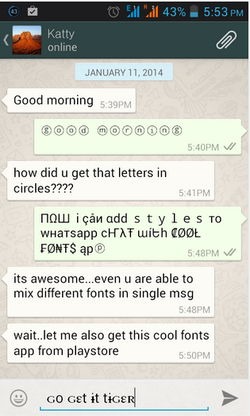
How to get this Cool Fonts for Whatsapp & SMS ? - 5 easy steps

cool-fonts-android-app
  1. Install the Cool Fonts Application on your android device.
  2. Now after installing it you can open the app and you will see the font selecting option.
  3. Choose the font you like and then simply write your message.
  4. Now you will see icons below the message field that allows you to export your message directly to your WhatsApp or Facebook.
  5. So click those and you can share your message easily, well the other way is to copy the whole text and then share it on your own, where ever you would like to share it.


Ha, thats pretty easy!! Wasn't it.

If you guys still did not figure it out or having problem with installation, please let me know in comment box below. Our moderators shall be reviewing them and replying to you as soon as possible. Till then enjoy and let me know what would you like to learn more about.

Enjoy Christmas. :) Merry Christmas friends. 

Thursday, June 12, 2014

FREE LIVE FIFA WORLD CUP FOOTBALL

 
liv_sports_app.jpg


 You can also visit the website directly, and go to their World Cup Page. Otherwise, here is a list of broadcasters for the Fifa World Cup globally.


Liv Sports website
livsports_screenshot.jpgSony Liv has the digital rights for the Fifa World cup in India, and you can watch along on their webpage. To watch the matches, just visit the website from your computer and register online for free. Aside from watching the streams, you can also get information about the games, match stats, highlights and exclusive interviews. The website is offering the Fifa World Cup pack for 120 rupees for the entire tournament, which seems like quite a bargain.

YouTube
youtube_fifa_screenshot.jpgIn case the Liv Sports website isn't working properly for some reason, you can double check with the official Sony Six Channel on YouTube. The channel will carry a delayed broadcast of the matches, which might also be handy if you've missed something exiting and want to "rewind" a little. Also, on the official Fifa channel on Youtube you can watch highlights from the matches, and also classic matches and other videos.

Liv Sports app
This is the official app for Sony Liv, and the easiest way to watch the matches on your phone or tablet. However, it also requires an up-front payment to watch the action, just like the website.
On your phone, you need to download the Liv Sports app (pictured above), which is available for both iOS and Android devices. The app is free to download, but you need to pay to watch the streams. A Rs. 120 in-app purchase will give you access to everything, but if you just want to follow your favourite team, you could unlock all the matches of a single team for Rs. 60.
Aside from the HD streams, the app also includes real time stats and commentary of the matches, which are available to everyone.

Tata Sky Everywhere TV app
everywhere_tv_1.jpgIf you are a Tata Sky subscriber then you can download the mobile application for iPhone, iPad or Android devices and watch the World Cup live. After that, you will need to activate Everywhere TV from Tata Sky, which is free for one month. After that, Tata Sky charges Rs. 60 for the service.
This is not a bad deal for a Tata Sky user, since it gives you access not just to the matches, but all your TV channels, on the go. And since the first month is free, you could use this to watch the matches without paying anything

You can also log in to fwcbrazil2014.com ( the link may not work in some countries) .
Or if nothing is working fast for you, the last option is here. Cheers. LAST LINK

ENJOY THE WORLD CLASS FOOTBALL.

You can always leave your queries on comment box below.


Friday, May 16, 2014

How to Get Free Live IPL Match Details on Mobile


ipl-league-image

IPL is a BIG FEVER.
It has just commenced and people are crazy about these short timespan matches, as it has filled everyone's heart And guess what? you might want to be connected to the live score feed and receive IPL Score live on your mobile device so that you do not miss any movement . I bet you want that for free too. :P (silly we)

So I have come up with this easy-cheesy tricks to get all the live IPL scores right on your mobile using messages pretty easily and that too for free.

Get Free IPL Live Score SMS on Mobile

You just need to follow these small steps:
  1. Just dial toll free number 18002082030
  2. Now after 1-2 seconds the call will be automatically disconnected.
  3. Now within few seconds you will receive message from them containing team name, their scores and other things.
So that's it guys now I think you can possibly enjoy these IPL Matches a in whole new dimension. ENJOY
Place your comments or thanks-giving in thread below or follow me in twitter @sushil_NASA

Tuesday, April 1, 2014

UNDO YOUR GMAIL MAILS - VIEWERS REQUEST EDITION


I think we all do have some mail account. In fact. in todays world, we cannot preclude the use of mail in daily life. From friends to business, email is a must.
Well, since my viewers mailed me a lot about posting some tricks regarding Gmail, I did some research and came along with this extremely handy trick.

Well, this is not fooling around on April 1st. This really works :P Sometimes you need to trust me. LOL :D

Ok lets get to the steps then.

Most of us don't know how to undo a mail sent in Gmail .Yes to all those smart-ass, we can do it and it is easy enough. Don't over react.


For this you have to enable google labs and you can do this easily by following these steps below:

1. Click the gear icon in the top right corner of your Gmail window and select Settings from the dropdown menu.


2. Select Labs from the row of tabs.

3. Scroll all the way to the bottom where you see Undo Send and click Enable.

4. Hit Save Changes at the bottom.

5. Now when you send an email, the yellow dialogue that displays "Your message has been sent" will also give you the option to Undo.

6. Just by clicking on that button you can undo your message.


Guys and girls, You all can send me your valuable queries right in my inbox.
My mail id is - sweet.nasa1@gmail.com or tweet  as well as follow me in @sushil_NASA

Thanks for loving this blog and to all my followers in twitter. Without your love and support, the site would not progress.